Social Media Image Sizes 2026: Every Platform, Verified
Every social media image size for 2026: Instagram, Facebook, TikTok, X, LinkedIn, YouTube and Pinterest, each checked against the platform's own help pages.
- By
- The OneSize team
- Published
- Reading time
- 7 min read
Quick answer
Use 1080 × 1350 px (4:5) for Instagram, Facebook and LinkedIn feed posts, 1080 × 1440 px (3:4) for tall Instagram posts, 1080 × 1920 px (9:16) for Stories, Reels and TikTok, 1600 × 900 px (16:9) for X, 1280 × 720 px for YouTube thumbnails and 1000 × 1500 px (2:3) for Pinterest. Every size in this guide links to the platform's own documentation.
On this page
The short version: design feed posts at 1080 × 1350 px (4:5), vertical content at 1080 × 1920 px (9:16) and landscape images at 16:9, then crop for the few placements that need something different. The table below has every common size. Each platform section links to the platform's own documentation, so you can check the source yourself.
Social media image sizes at a glance
| Platform | Placement | Size (px) | Aspect ratio |
|---|---|---|---|
| Portrait feed post | 1080 × 1350 | 4:5 | |
| Tall feed post | 1080 × 1440 | 3:4 | |
| Square feed post | 1080 × 1080 | 1:1 | |
| Landscape feed post | 1080 × 566 | 1.91:1 | |
| Story / Reel | 1080 × 1920 | 9:16 | |
| Feed post | 1080 × 1350 | 4:5 | |
| Feed ad (recommended) | 1440 × 1800 | 4:5 | |
| Story | 1080 × 1920 | 9:16 | |
| Page profile picture | 320 × 320 | 1:1 | |
| TikTok | Photo / video | 1080 × 1920 | 9:16 |
| X | In-feed image | 1600 × 900 | 16:9 |
| X | Profile photo | 400 × 400 | 1:1 |
| Feed image (portrait) | 1080 × 1350 | 4:5 | |
| Link / landscape image | 1200 × 627 | 1.91:1 | |
| Company Page cover | 4200 × 700 | 6:1 | |
| YouTube | Video thumbnail | 1280 × 720 | 16:9 |
| YouTube | Channel banner | 2560 × 1440 | 16:9 |
| Standard Pin | 1000 × 1500 | 2:3 |
The seven aspect ratios behind every size
Aspect ratio matters more than pixel count. If an image has the right shape, the platform scales it cleanly. If the shape is wrong, the platform crops it, usually from the centre. Almost every social placement uses one of seven shapes.

If you only make three versions of an image, make these: 4:5 for feeds, 9:16 for Stories, Reels and TikTok, and 16:9 for X and YouTube.
Instagram image sizes
Instagram stores photos at up to 1080 px wide and accepts any aspect ratio between 1.91:1 (landscape) and 3:4 (portrait). That means 1080 px wide and anywhere from 566 to 1440 px tall, according to Instagram's Help Center. Anything outside that range is cropped. Photos narrower than 320 px are enlarged, and anything wider than 1080 px is scaled down.
| Placement | Size (px) | Ratio |
|---|---|---|
| Tall feed post | 1080 × 1440 | 3:4 |
| Portrait feed post | 1080 × 1350 | 4:5 |
| Square feed post | 1080 × 1080 | 1:1 |
| Landscape feed post | 1080 × 566 | 1.91:1 |
| Story / Reel | 1080 × 1920 | 9:16 |
Your profile grid now shows every post as a 3:4 tile, so a square or landscape post loses its sides on your profile. A 3:4 post fills the tile exactly, but Meta's ad tools only support feed images between 1.91:1 and 4:5. Our Instagram post size guide explains which shape to choose and why.
Facebook image sizes
Use 4:5 portrait in the feed. Meta's ads guide recommends 1440 × 1800 px for 4:5 Facebook feed ads, with a minimum width of 600 px. For organic posts, 1080 × 1350 px is the same shape and plenty sharp on phones.
| Placement | Size (px) | Ratio |
|---|---|---|
| Feed post (organic) | 1080 × 1350 | 4:5 |
| Feed ad | 1440 × 1800 | 4:5 |
| Story | 1080 × 1920 | 9:16 |
| Page profile picture | 320 × 320 | 1:1 |
| Page cover photo | 851 × 315 | ~2.7:1 |
For Pages, Facebook's Help Center recommends a 320 × 320 px profile picture. It says a cover photo must be at least 400 × 150 px and loads fastest as an sRGB JPEG of 851 × 315 px under 100 KB. Covers are cropped differently on computers and phones, and the profile picture overlaps the left side, so keep text and logos in the centre.
TikTok image sizes
Design at 1080 × 1920 px (9:16). TikTok's in-feed ad specs list vertical 9:16 as the recommended format, with horizontal 16:9 and square 1:1 also supported. TikTok's interface covers a lot of the screen: the caption and sound at the bottom, buttons down the right and tabs across the top. Keep text and faces in the centre.

X (Twitter) image sizes
Use 16:9 or 1:1. X's creative best practices recommend those two ratios for images and videos, and note that most of its audience is on mobile. At 16:9, 1600 × 900 px gives a sharp result. X's ad specs now also accept 4:5, 2:3 and 9:16 creatives, so vertical images aren't rejected outright.
| Placement | Size (px) | Ratio |
|---|---|---|
| In-feed image | 1600 × 900 | 16:9 |
| Square image | 1080 × 1080 | 1:1 |
| Profile photo | 400 × 400 | 1:1 |
X's help page on profile photos recommends 400 × 400 px and a JPEG, GIF or PNG file under 2 MB.
LinkedIn image sizes
LinkedIn accepts feed photos from 3:1 to 4:5 and recommends at least 1080 px wide. The minimum is 552 × 276 px and the upload limit is 5 MB, per LinkedIn Help. A 1080 × 1350 px portrait takes up the most space in the feed.
| Placement | Size (px) | Ratio |
|---|---|---|
| Feed image (portrait) | 1080 × 1350 | 4:5 |
| Feed image (square) | 1080 × 1080 | 1:1 |
| Link preview / landscape | 1200 × 627 | 1.91:1 |
| Company Page logo | 400 × 400 | 1:1 |
| Company Page cover | 4200 × 700 | 6:1 |
The 1200 × 627 px size is LinkedIn's documented minimum for link previews (the Open Graph image on your website). Company Page logo and cover sizes come from LinkedIn's Page image specifications, which cap Page images at 3 MB.
YouTube image sizes
Make custom thumbnails 1280 × 720 px (16:9). Google lists that as the recommended thumbnail resolution, and YouTube Help accepts thumbnails up to 3840 × 2160 px with a minimum width of 640 px. The video timestamp sits in the bottom-right corner, so keep text out of it.
| Placement | Size (px) | Ratio |
|---|---|---|
| Video thumbnail | 1280 × 720 | 16:9 |
| Channel banner | 2560 × 1440 | 16:9 |
| Profile picture | 98 × 98 (renders) | 1:1 |
For channel banners, YouTube recommends 2560 × 1440 px and requires at least 2048 × 1152 px. Only a 1235 × 338 px strip in the middle is guaranteed to show on every device, so keep text and logos inside it.
Pinterest image sizes
Use 2:3 at 1000 × 1500 px. That's Pinterest's own recommendation, and Pins taller than 2:3 may be cut off in feeds. Pinterest's Pin specs also list 1:2, 3:4, 4:5 and 1:1 as options, and a 20 MB limit for uploads on the web.
Make every size from one image
Most people don't need every size at once. A typical post needs three to six versions of the same image, and the slow part is cropping each one so the subject stays in frame. OneSize does this in one place. Upload once, adjust the crop for each format, preview them side by side and download the set as a ZIP. Processing happens in your browser, so the image never leaves your device.
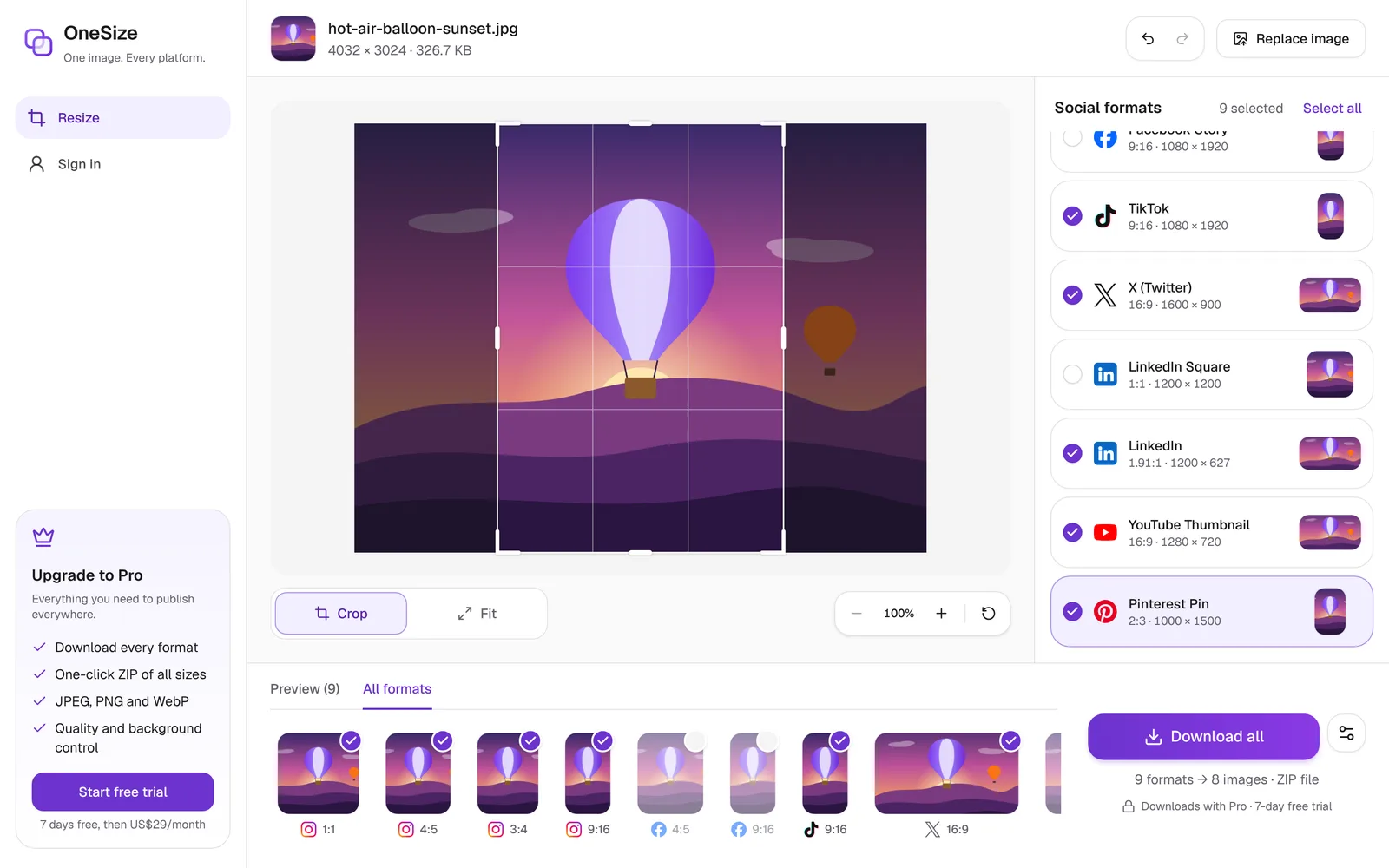
These are the exact formats OneSize exports. The table is generated from the app's own settings, so it always matches what you download.
| Platform | Format | Size (px) | Ratio |
|---|---|---|---|
| Instagram Post | 1080 × 1080 | 1:1 | |
| Instagram Portrait | 1080 × 1350 | 4:5 | |
| Instagram Tall | 1080 × 1440 | 3:4 | |
| Instagram Story / Reels | 1080 × 1920 | 9:16 | |
| Facebook Post | 1080 × 1350 | 4:5 | |
| Facebook Story | 1080 × 1920 | 9:16 | |
| TikTok | TikTok | 1080 × 1920 | 9:16 |
| X | X (Twitter) | 1600 × 900 | 16:9 |
| LinkedIn Square | 1200 × 1200 | 1:1 | |
| 1200 × 627 | 1.91:1 | ||
| YouTube | YouTube Thumbnail | 1280 × 720 | 16:9 |
| Pinterest Pin | 1000 × 1500 | 2:3 |
Tips that apply to every platform
- Start from the original file. Every export from a design tool or messaging app recompresses the image. Resize from the camera original or the master design.
- Crop, don't stretch. Changing the shape without cropping distorts the image or adds bars. Choose the crop yourself so the subject stays in frame.
- Keep text away from the edges. Grids, overlays and different devices crop the edges first. A centred safe area survives all of them.
- Use JPEG for photos and PNG for graphics with text. Both are accepted everywhere. PNG keeps small text and flat colour sharp.
- Re-check sizes when a platform redesigns. Instagram's 2025 switch to a 3:4 profile grid changed how existing posts appear on every profile.
Frequently asked questions
- What is the best image size for all social media?
- No single size works everywhere, but 1080 × 1350 px (4:5) comes closest for feed posts: Instagram, Facebook and LinkedIn all display it without cropping. Add a 1080 × 1920 px (9:16) version for Stories, Reels and TikTok and a 16:9 version for X and YouTube, and you cover almost every placement.
- What size should a social media image be in pixels?
- Make the shorter side at least 1080 px for feed posts and design vertical formats at 1080 × 1920 px. Instagram stores photos at a maximum width of 1080 px, so going wider for Instagram adds file size without adding detail. YouTube thumbnails (1280 × 720 px) and Pinterest Pins (1000 × 1500 px) are the main exceptions.
- What aspect ratio is 1080 × 1350?
- 1080 × 1350 px is a 4:5 portrait ratio. It is the standard tall feed size on Instagram and Facebook, and LinkedIn accepts photos up to 4:5 tall, so the same file works on all three.
- Are social media image sizes the same for ads and organic posts?
- Mostly, but not always. Meta's ads guide, for example, recommends 1440 × 1800 px for 4:5 Facebook feed ads, and Meta's ad tools only support Instagram feed images between 1.91:1 and 4:5, so a 3:4 organic post cannot be reused as an Instagram feed ad without cropping.
- How often do social media image sizes change?
- The core feed and Story sizes are stable, but platforms change secondary formats every year or two — Instagram switched its profile grid to 3:4 in 2025, for example. We re-check every figure in this guide against official documentation at least quarterly and update the date at the top.