Instagram Post Size 2026: 1080 × 1440 and the 3:4 Grid
The right Instagram post size for 2026: when to use 1080 × 1440 (3:4) or 1080 × 1350 (4:5), how the 3:4 profile grid crops posts, plus Story and Reel sizes.
- By
- The OneSize team
- Published
- Reading time
- 5 min read
Quick answer
Instagram now accepts photos from 1.91:1 to 3:4, so the tallest feed post is 1080 × 1440 px. Use 3:4 (1080 × 1440) for organic photo posts: it fills the feed and matches the 3:4 profile grid with no crop. Use 4:5 (1080 × 1350) for anything you'll boost or run as an ad, because Meta's ad tools stop at 4:5. Stories and Reels are 1080 × 1920 (9:16).
On this page
The tallest Instagram post is now 1080 × 1440 px (3:4). Instagram's Help Center lists supported photo ratios from 1.91:1 to 3:4. Many guides still say 4:5 is the maximum, because Instagram's own help page said so until the 3:4 change. The choice between the two tall sizes comes down to one question: will you ever boost or advertise the post?
Instagram post sizes at a glance
| Format | Size (px) | Ratio | Use it for |
|---|---|---|---|
| Tall post | 1080 × 1440 | 3:4 | Organic photo posts, grid-perfect |
| Portrait post | 1080 × 1350 | 4:5 | Posts you'll boost or run as ads |
| Square post | 1080 × 1080 | 1:1 | Assets shared with other platforms |
| Landscape post | 1080 × 566 | 1.91:1 | Wide shots (heavily cropped in the grid) |
| Story / Reel | 1080 × 1920 | 9:16 | Full-screen vertical content |
| Profile grid tile | 3:4 crop | 3:4 | How every post appears on your profile |
Instagram's Help Center says photos between 320 and 1080 px wide keep their original resolution if the ratio is between 1.91:1 and 3:4. At 1080 px wide, that allows any height from 566 to 1440 px. Wider photos are scaled down to 1080 px, narrower ones are enlarged, and other ratios are cropped to fit.
What changed: the 3:4 grid and 3:4 uploads
There were two changes, both in 2025.
- The profile grid became 3:4. In January 2025, Instagram replaced the square profile grid with taller rectangles. Adam Mosseri explained that most uploads are vertical and cropping them to squares is "pretty brutal".
- 3:4 became an upload size. Later in 2025, Instagram started accepting 3:4 photos in the feed without cropping them, which Mosseri confirmed on Threads. This is the change that made 1080 × 1440 px a valid post size.
Together, these mean a 3:4 post is the only shape that looks the same in the feed and on your profile.
How the profile grid crops each post shape
Every post is centre-cropped to a 3:4 tile on your profile. Here's how much of each shape stays visible:

One detail that many guides get wrong: a 4:5 post loses its sides in the grid, not its top and bottom. A 3:4 tile is narrower than 4:5, so a 1080 × 1350 px post shows as roughly 1013 × 1350 px. That works out to about 34 px off each side. A 9:16 image is the opposite: the tile keeps the middle 1440 px of its 1920 px height.
You can change the crop on individual posts. Open the post's menu and choose Adjust preview to move it or switch to Fit.
3:4 or 4:5: which should you use?
Use 3:4 (1080 × 1440 px) for organic photo posts. It's the tallest post Instagram allows, so it takes up the most space in the feed. It also matches the grid tile exactly, so nothing is hidden on your profile.

Use 4:5 (1080 × 1350 px) for posts you'll boost, promote or reuse as ads. Meta's ads documentation only supports Instagram feed images between 1.91:1 and 4:5, and crops taller images to 4:5. A 3:4 creative will be trimmed if you advertise it. Some scheduling tools that publish through Meta's API may also not accept 3:4 yet. Check yours before you build a template library around it.
If in doubt, design at 4:5 and keep important content inside the centre 3:4 area. It works for ads and loses almost nothing in the grid.
Carousels
Every slide in a carousel has the same shape. Instagram applies the orientation you pick to every photo and video in the post, so set the size on the first slide and match the rest to it. The grid shows the first slide, cropped to 3:4.
Stories and Reels: 1080 × 1920
Stories and Reels are full-screen 9:16 at 1080 × 1920 px. The app's interface covers part of that frame:
- Stories: the profile name and progress bar take roughly the top 14% and the reply bar the bottom 14%. Keep text inside the middle of the frame.
- Reel covers: on your profile, a Reel shows as a 3:4 crop from the middle of the 9:16 frame. That loses 240 px from the top and bottom. Put the cover's title in the centre 1080 × 1440 px.
How to make a 1080 × 1440 version of any photo
Most phone photos are already 3:4, so they upload as they are. For anything else, such as a landscape shot, a square design or a 9:16 Story, you need to choose the crop yourself. Otherwise Instagram centre-crops it for you.
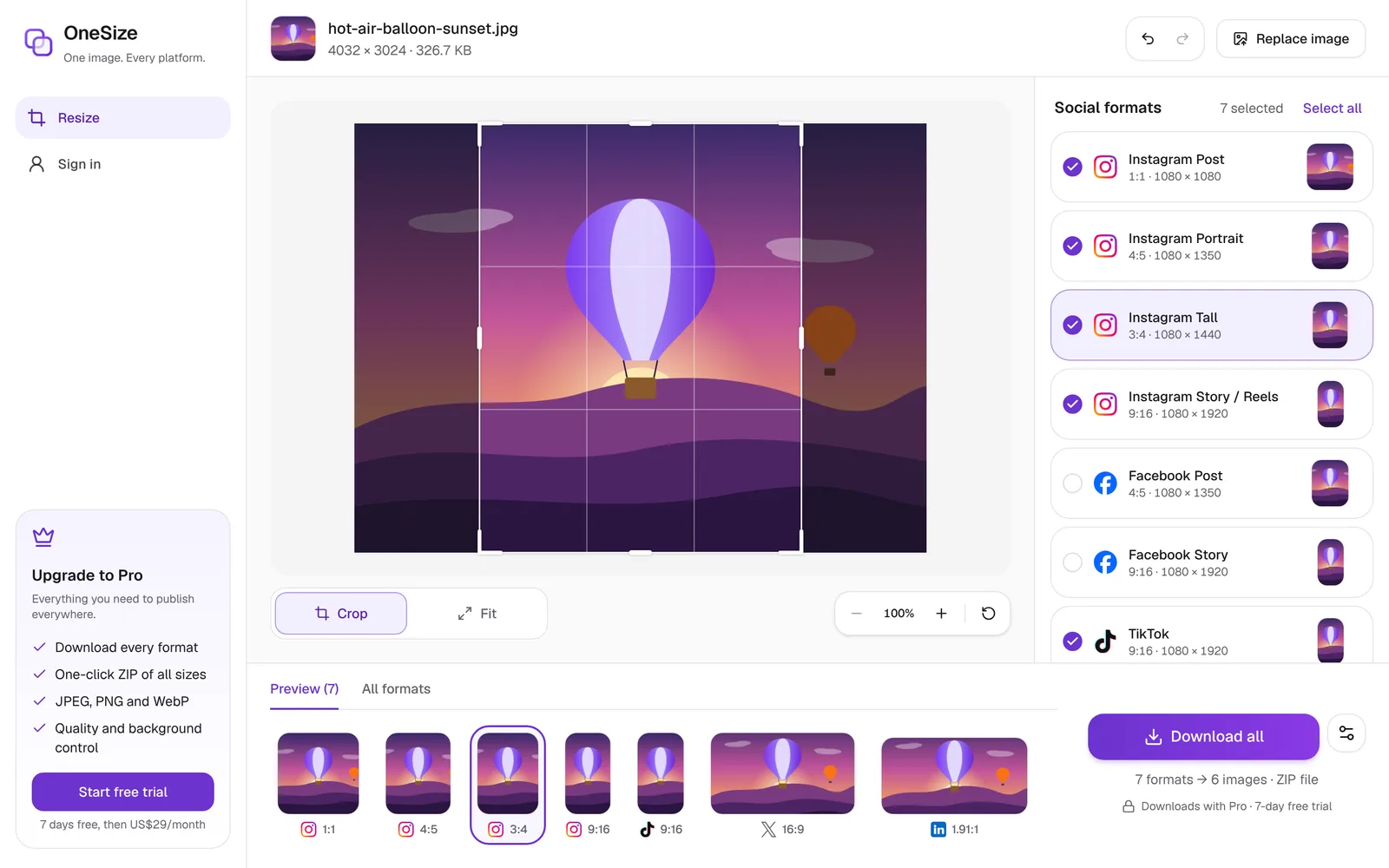
In OneSize, upload the photo and select Instagram Tall (3:4), Instagram Portrait (4:5) and Story / Reels (9:16). Drag each crop so the subject sits where you want it, then download all three at the exact sizes. Every version is made from the original file, and the image stays in your browser the whole time.
Quick checklist before you post
- Feed photo: 1080 × 1440 px (3:4), or 1080 × 1350 px (4:5) if it might become an ad.
- Edges: keep text and faces off the outer 34 px on the left and right of a 4:5 post.
- Carousel: all slides the same size as the first.
- Story: 1080 × 1920 px, with text away from the top and bottom 270 px.
- Reel cover: 1080 × 1920 px, with the title in the middle 1440 px.
- Width: exactly 1080 px. Larger is scaled down, and smaller than 320 px is enlarged and looks soft.
For every other platform, see the social media image sizes cheat sheet.
Frequently asked questions
- What is the best Instagram post size in 2026?
- For organic photo posts, 1080 × 1440 px (3:4). It is the tallest shape Instagram accepts and the only one that matches the 3:4 profile grid tile exactly. If you plan to boost the post or reuse it as an ad, use 1080 × 1350 px (4:5) instead, because Meta's ad tools only accept feed images up to 4:5.
- Is 1080 × 1350 still a good Instagram size?
- Yes. 1080 × 1350 px (4:5) displays without cropping in the feed and works for ads. On your profile grid it loses about 34 px from each side, because the 3:4 tile is slightly narrower than a 4:5 post. Keep text and faces away from the left and right edges and you won't notice.
- Why does Instagram crop my photos on my profile?
- Since January 2025 the profile grid shows every post as a 3:4 rectangle, centre-cropped from the original. Square posts lose their sides, landscape posts lose most of their width and 9:16 images lose their top and bottom. The full image is still shown when someone opens the post, and you can change the grid crop with Adjust preview in the post's menu.
- What size is an Instagram Story or Reel?
- 1080 × 1920 px (9:16). Roughly the top and bottom 14 percent of a Story is covered by the profile bar and reply bar, so keep text in the middle. A Reel's cover is centre-cropped to 3:4 on your profile, so design the cover with the important part in the middle 1080 × 1440 px.
- What happens if I upload a photo wider than 1080 px?
- Instagram scales it down to 1080 px wide. Uploading larger doesn't add detail, but it doesn't hurt either. Photos narrower than 320 px are enlarged and will look soft, so aim for exactly 1080 px wide.
- Can carousel slides have different sizes?
- No. The orientation you choose for a carousel applies to every photo and video in it, so all slides share the first slide's shape. Make every slide at the same size, for example all 1080 × 1440 or all 1080 × 1350.